
AI File Upload vs. Full-File Review: How to Verify Coverage
Learn why uploading a file to an AI system does not prove full-file review and how to verify extraction, retrieval, context coverage, and the final output.
An AI answer can be fluent, structured, and still be based on incomplete source coverage.
That is one of the main risks in file-based AI work.
Users often treat file upload as proof that the full document was reviewed. In many file-based AI and retrieval workflows, that assumption is not reliable. The file may be available to the system without being fully represented in the model’s active context.
This is not an argument that AI systems cannot work with files. They can. The issue is that file access, retrieval, active context, and full-file review are different stages. A professional workflow should not collapse them into one assumption.
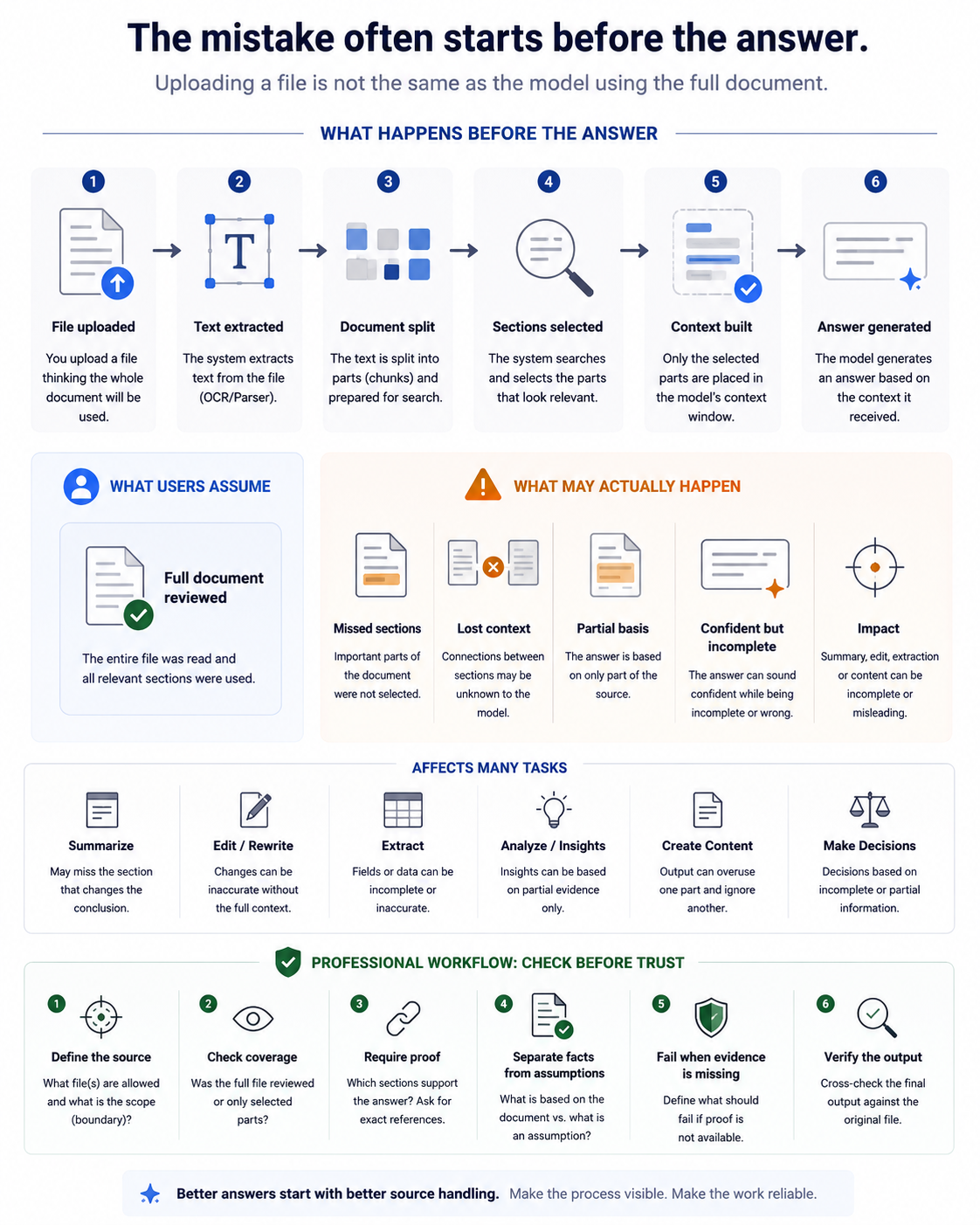
The weak assumption
The common assumption is:
Upload file → AI reads the full document → Reliable answer
That assumption is too broad for professional work.
A more accurate workflow is:
Upload file → Process file → Select source context → Generate answer
Those are not the same thing.
OpenAI’s ChatGPT Enterprise file-upload guidance describes different processing paths for different file types. For text-based documents, it describes text extraction, placing some text directly into the context window, and storing some text for search. It also notes that this approach can struggle with tasks such as summarizing very large documents or comparing multiple large files.
The practical consequence is simple: an answer can be generated from the context that reached the model, not necessarily from the entire file the user uploaded.
What happens before the answer
1. File uploaded
The workflow starts when the user uploads a file or provides a file through a connected source.
At this point, the file is an available input artifact. That does not prove that the full file has been reviewed, interpreted, or used by the model.
The professional distinction is:
Available to the system ≠ used in the answer
A file can exist in the workspace, project, thread, knowledge base, or retrieval store while only selected parts influence a specific answer.
2. Text extracted
Before a model can answer from a document, the system often needs to extract usable content from the file.
For text-based documents, this may include extracting text from PDFs, presentations, Word files, text files, markdown files, JSON, XML, or similar formats. Other file types may follow different processing paths. For example, OpenAI documents that spreadsheets may be handled through Code Interpreter, images may be interpreted through multimodal models, and PDFs can involve both text and visual retrieval depending on how they are provided.
Possible failure points:
| Failure point | Why it matters |
|---|---|
| Text is extracted without preserving layout | Tables, captions, headers, footnotes, or section relationships may lose meaning. |
| Visual or embedded content is handled differently by file type | A diagram, chart, or screenshot may not be represented the same way as normal text. |
| Structured files are routed to a different tool path | A spreadsheet or structured file may be analyzed differently from a plain document. |
| The user assumes the visible file and extracted text are identical | The model may work from an extracted representation, not from the original document view. |
The first professional check is not only:
Did I upload the file?
It is:
What content was actually extracted or made usable for the task?
3. Document split into parts
Large documents are often split into smaller units before retrieval or indexing.
OpenAI’s File Search documentation states that adding a file to a vector store automatically parses, chunks, embeds, and stores the file in a vector database capable of keyword and semantic search. The same documentation lists default File Search settings, including 800-token chunks, 400-token overlap, and a maximum number of chunks added to context. Google’s Gemini API File Search documentation describes a similar pattern: imported files are broken into chunks, embedded, indexed, and uploaded to a File Search store.
Chunking is useful. It makes large-document retrieval possible.
But it also changes the unit of retrieval from:
The full document
to:
Selected parts of the document
Possible failure points:
| Failure point | Why it matters |
|---|---|
| A meaningful section is split across chunks | The answer may use one side of the section without the surrounding context. |
| A definition and its exception are separated | The model may retrieve the definition but miss the exception. |
| Cross-references are not retrieved together | Appendices, footnotes, and dependencies may be missed. |
| Local meaning survives but document-level meaning is weakened | A chunk can be relevant and still incomplete. |
A model may answer from technically relevant chunks while still missing the broader document structure.
4. Sections selected or retrieved
After chunking and indexing, the system may retrieve sections that appear relevant to the user’s request.
Retrieval is useful because it allows systems to work with large files without putting the entire document into the active context. But retrieval also introduces a selection layer.
OpenAI describes File Search as rewriting user queries, breaking complex queries into multiple searches, running keyword and semantic searches, and reranking results before generation. Google describes File Search as semantic search over document chunks represented as embeddings, where the system searches for the most similar and relevant chunks to ground the response.
Possible failure points:
| Failure point | Why it matters |
|---|---|
| The selected sections are relevant but incomplete | The answer may look grounded while missing a material section. |
| The obvious section is retrieved, but a dependency is missed | A later clause, exception, or constraint can change the conclusion. |
| A document-level task is answered from section-level evidence | Summarization, rewriting, and review often require whole-document coverage. |
| Search returns what matches the query, not everything the task requires | The query can shape the evidence that enters the answer. |
Retrieved context is selected evidence, not proof of exhaustive review.
5. Active context built
The model generates from the context and tool results made available during the task.
This is the core point: the uploaded file, the indexed file, the retrieved chunks, and the model’s active context are not the same object.
OpenAI’s ChatGPT Enterprise guidance describes a maximum context window and states that not all tokens are used to incorporate uploaded files. It also describes a workflow where some text is placed directly in the context window while other text is stored for search. OpenAI’s File Search documentation also states that the maximum number of chunks added to context may be limited.
Possible failure points:
| Failure point | Why it matters |
|---|---|
| Only part of the file is active in context | The answer may be based on partial source coverage. |
| Relevant but non-retrieved sections stay outside the answer | The output may omit material information. |
| Context budget forces selection | Even available content may not all fit into the active generation context. |
| The model sounds complete because generation is fluent | Fluency is not evidence of full source coverage. |
The central question is not only:
Was the file uploaded?
It is:
What source context was active when the answer was generated?
6. Answer generated
Only after processing, splitting, retrieval, and context construction does the model generate the answer.
At this stage, the output may be well-written and still wrong.
The failure may not be a writing failure. It may be a source-coverage failure.
| Task | Possible failure mode |
|---|---|
| Summary | Misses the section that changes the conclusion. |
| Edit / rewrite | Improves wording while weakening the original meaning. |
| Extraction | Returns only fields found in selected sections. |
| Content draft | Overuses one part of the file and ignores another. |
| Recommendation | Sounds confident while relying on partial evidence. |
| Document review | Finds local issues but misses cross-document dependencies. |
A polished answer is not enough. A professional answer must be reviewable against the source.
Why this affects more than editing
This problem is not limited to document editing.
It affects any task where the answer is expected to be based on a file or source artifact:
- summarization
- rewriting
- content creation
- information extraction
- document review
- research synthesis
- compliance review
- decision support
- technical review
- requirements analysis
The common risk is the same: the output may appear complete while being based on incomplete source coverage.
What this article is not saying
This article is not saying that retrieval is bad.
Retrieval is often the only practical way to work with large documents, multi-file projects, knowledge bases, or long-running source material.
The issue is not retrieval itself. The issue is treating retrieval as if it were the same as full-file review.
A cited section can prove where a specific claim came from. It does not, by itself, prove that nothing important was missed elsewhere in the file.
That distinction matters.
Source grounding verifies what was used.
Coverage validation checks what may have been missed.
Both are needed for professional file-based AI work.
The professional solution: make the source trail visible
The solution is not simply to ask the model to “read carefully.”
The solution is to make file-based AI work traceable, reviewable, and evidence-bound.
NIST AI 600-1 is not a file-review procedure and does not prescribe this exact workflow. It is a broader generative AI risk-management profile. Its framing is still relevant here because it emphasizes governance, content provenance, transparency, and risk management across the AI lifecycle.
For file-based AI work, that translates into a practical workflow.
1. Define the source boundary
Before the task starts, define what the model is allowed to use.
The source boundary should answer:
- Which file or files are in scope?
- Are external sources allowed?
- Is general model knowledge allowed?
- Should the answer rely only on uploaded artifacts?
- What should happen if the file does not contain enough evidence?
Without a source boundary, the output can mix document evidence, generic knowledge, assumptions, and unsupported completions.
2. Check source coverage
The workflow should require visible coverage information.
For small files, this may mean confirming full-file review.
For large files, ZIPs, repositories, PDFs, spreadsheets, logs, or multi-document tasks, this should include a coverage report:
- files reviewed
- files not reviewed
- sections used
- sections not available
- partial coverage
- retrieval-based coverage
- limits that affected the answer
If the tool exposes retrieved chunks, citations, page references, line references, file-search results, or coverage logs, use those as evidence. If it does not, a model statement about coverage should be treated as a useful signal, not as proof.
3. Require source references
For professional work, important claims should point back to exact source locations.
Depending on the file type, that may mean:
- page number
- section heading
- line number
- table name
- field name
- filename
- paragraph reference
- stable locator
References help verify what was used. They do not, by themselves, prove that the full document was reviewed.
4. Separate facts from assumptions
The workflow should distinguish between:
- what the document explicitly says
- what is inferred from the document
- what is missing from the document
- what would require external verification
- what the model is assuming
This prevents partial reading from becoming false certainty.
5. Fail when evidence is missing
A strong workflow does not force an answer when the source is insufficient.
It should fail closed when:
- the required section was not found
- the relevant file was not reviewed
- the evidence is incomplete
- the source contradicts the requested output
- the requested conclusion is not supported by the document
In professional AI work, “not enough evidence” is a valid output.
6. Verify the output against the original artifact
The final output should be checked against the original source before use.
This verification step should ask:
- Does the answer match the source?
- Were all material sections considered?
- Are the references accurate?
- Did the model introduce unsupported content?
- Did the edit preserve meaning?
- Did the summary omit a critical exception?
- Did the extraction miss fields?
- Did the recommendation rely on partial evidence?
The point is not to make the answer longer.
The point is to make the answer auditable.
For a claim-level workflow that checks source support, citations, uncertainty, and corrections before an output is accepted, use How to Fact-Check AI-Generated Answers and Citations.
For the broader process that defines the outcome, evidence boundary, capability, scope, execution, and verification before relying on an AI result, use the six-step professional ChatGPT workflow.
Levels of verification
Not every workflow exposes the same level of evidence.
A practical review hierarchy is:
| Level | Check | Verification value |
|---|---|---|
| Weak | The model says it reviewed the file. | Useful signal, but not proof. |
| Better | The answer includes exact references to source sections. | Verifies what was used for specific claims. |
| Stronger | The tool exposes retrieved chunks, file-search results, page references, line references, or retrieval logs. | Supports inspection of the source trail. |
| Strongest | The final output is manually or programmatically checked against the original artifact. | Validates the output before downstream use. |
The absence of retrieved evidence is also not proof that the full document does not contain the answer. It may only mean that the relevant section was not retrieved, not extracted, not exposed, or not included in the active context.
Better prompts are not enough
For file-based work, the issue is not just prompt wording.
A stronger prompt can ask for better behavior, but a professional workflow also needs source handling:
- define the source boundary
- check coverage
- require exact references
- separate evidence from assumptions
- fail when evidence is missing
- verify the final output
The target is not a more confident answer.
The target is a reviewable answer.
A better mental model
The weak mental model is:
I uploaded a file, so the AI read it.
The stronger mental model is:
I uploaded a file, and now I need to know what content was extracted, selected, retrieved, placed into context, and used in the answer.
That shift changes the workflow.
Instead of asking only:
Can you summarize this?
Ask:
Which parts of the file support the summary, what was not reviewed, and where is the evidence for each major claim?
Instead of asking only:
Can you edit this?
Ask:
Which sections support the edit, and did you verify that the change preserves the original meaning?
Instead of asking only:
Can you extract the key information?
Ask:
Which fields were found, which fields were missing, and where in the file does each extracted value appear?
Conclusion
File upload is not proof of full-file review.
The important question in file-based AI work is not only whether the model can generate a good answer.
The important question is whether the answer is grounded in the right source coverage.
Professional AI workflows should make that source trail visible:
- define the source boundary
- check coverage
- require exact references
- separate evidence from assumptions
- fail when evidence is missing
- verify the final output against the original artifact
That is the difference between using AI as a text generator and using AI as part of a professional evidence workflow.